
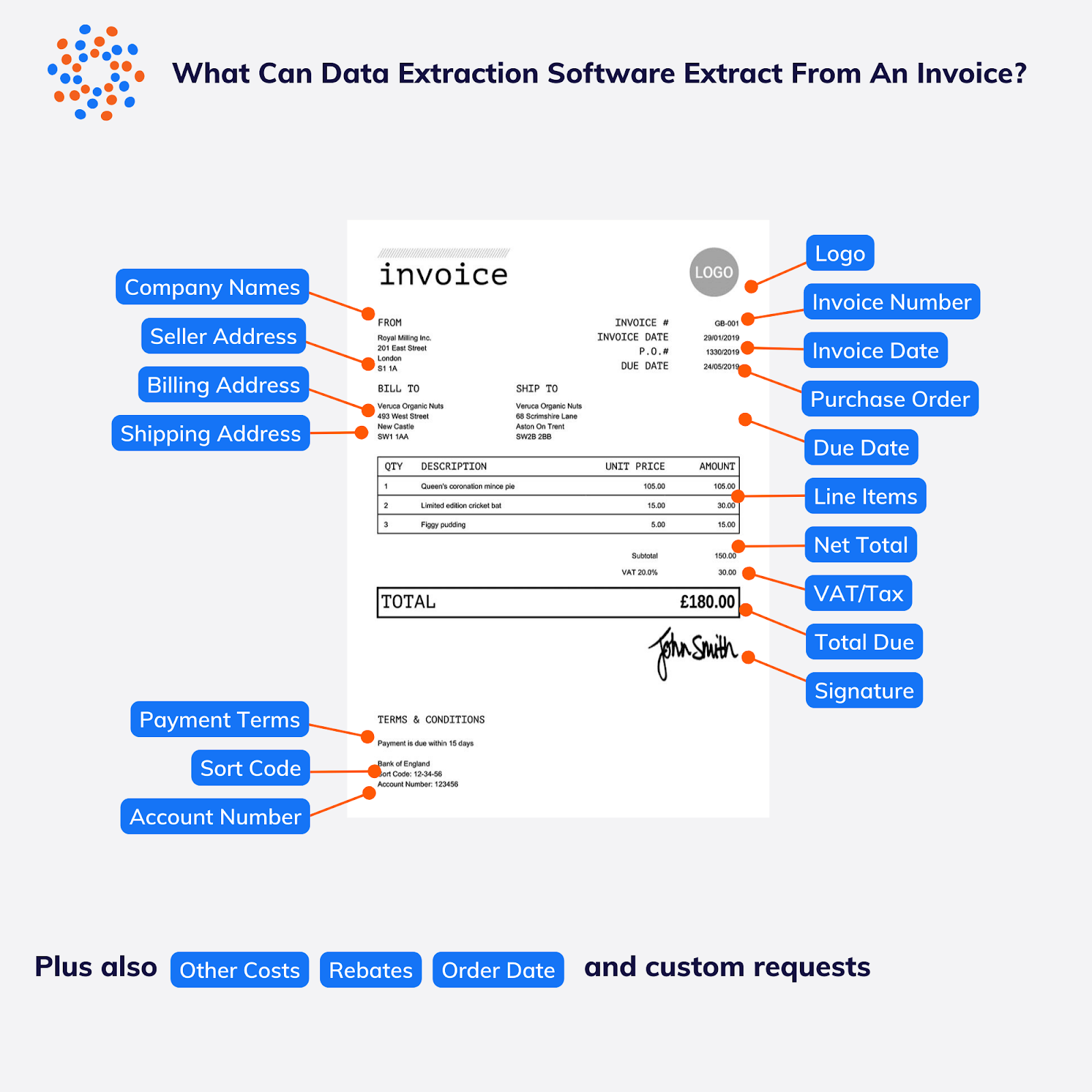
In today’s fast-paced business environment, manual invoice processing is a bottleneck — expensive in time, prone to human error, and stagnant when your workflow needs speed. Fortunately, cutting-edge AI-powered PDF to Excel tools are rewriting the rules by turning piles of invoices into clean, structured spreadsheets within seconds.
Let’s explore why this matters, how it works, and how your business can benefit from adopting invoice-to-Excel automation.
📉 The Problem: Manual Invoices Are Costly
Historically, accountants and operations teams have spent countless hours opening PDFs, reading line items, typing numbers, and re-keying data into Excel — a process fraught with headaches:
-
🕒 Time-intensive: 15–30 minutes per invoice
-
❌ Human errors: typos, misplaced totals, wrong dates
-
💼 Backlogs: especially during month-end or fiscal reporting
But there’s a better way.
🤖 Enter AI + OCR: The New Standard for Invoice Processing
Modern invoice extraction uses AI-powered Optical Character Recognition (OCR) combined with document intelligence. What does that mean?
👉 Instead of manually copying numbers, advanced AI reads PDFs and images — even scans — detects tables, fields, and invoice metadata, and transforms that into usable spreadsheet data.
Here’s what the technology automatically pulls out:
✔️ Invoice number
✔️ Vendor name and address
✔ Invoice date and due date
✔ Line items (description, quantity, unit price)
✔ Taxes, totals, and subtotals
✔ Any complex multi-page structure
🛠 3 Steps: From PDF to Spreadsheet in Under a Minute
1️⃣ Upload Your Files
Drag and drop PDFs — single files or entire folders — into the tool. You can handle invoices, receipts, POs, bank statements, and more.
2️⃣ AI Does the Heavy Lifting
Behind the scenes, the AI recognizes tables, text blocks, and line-item structures. It intelligently maps vendor details and numbers into structured data — no templates required.
3️⃣ Download or Export
Get a clean Excel (.xlsx) file ready for pivot tables, formulas, reconciliation, or upload to your accounting systems (like QuickBooks, SAP, NetSuite). You can also export to CSV or JSON for API integrations.
⚡ Why AI PDF to Excel Isn’t Just “Cool” — It’s Smart Business
🚀 Massive Time Savings
Batch processing lets you upload dozens or hundreds of files at once — and get results in minutes, not hours. Imagine 100 invoices done in under 3 minutes!
🎯 Higher Accuracy than Manual Entry
AI eliminates common data entry mistakes and ensures numbers, dates, and line items land in the right spreadsheet cells.
📊 Structured Data You Can Use
Once in Excel, your data is ready for:
-
Analysis dashboards
-
Budget reviews
-
Vendor performance tracking
-
Automated accounting imports
All without the endless copy–paste grind.
🔒 Data Security You Can Trust
Sensitive financial documents stay confidential. Good AI tools encrypt files during processing, don’t store or reuse your data for training, and auto-delete documents after extraction.
📈 Real Impact for Real Teams
Professionals across industries are seeing dramatic workflow improvements:
-
📊 Accounting teams cut days of data entry every month
-
🛒 Procurement teams automate purchase order reconciliation
-
🧾 E-commerce sellers consolidate invoices from multiple marketplaces
-
🏥 Healthcare offices streamline billing and insurance documentation
Annual savings add up quickly when spreadsheets are delivered instead of typed.
🧠 Not All Tools Are Created Equal — What to Look For
When choosing an AI PDF to Excel solution, check for:
🔹 Template-free extraction
🔹 Batch upload support
🔹 Multi-format import (PDF, JPG, PNG, TIFF)
🔹 Pre-export editing
🔹 Export formats for Excel, CSV, JSON
🔹 Integration with accounting systems
These features ensure you’re not just converting files — you’re revolutionizing workflows.
🚀 Get Started Today
Invoice processing doesn’t have to be your bottleneck. By leveraging AI OCR and automated PDF-to-Excel conversion, you can cut processing time from hours to seconds and free your team to focus on insights, not inputs.
💡 Tip: Start with a free trial to process a handful of invoices. You’ll immediately notice the difference in speed and accuracy.