
Convert Bank Statements to Excel
Stop cleaning bank statements by hand. Upload PDF bank statements and get clean Excel in seconds, with no templates, no field mapping, and no setup. Just drop a statement and the extraction begins.
- No templates or field mapping required
- Built-in balance validation catches errors instantly
- Duplicate detection flags double-counted transactions
- Batch multiple statements into one clean spreadsheet


 + many more
How do you convert a bank statement to Excel?
Upload your PDF bank statement to SendItSheets, let it extract every transaction (date, description, withdrawal, deposit, and running balance) into a structured table, review and edit any row, then download the result as an Excel (.xlsx) or CSV file. There are no templates to build and no field mapping to configure. A typical 2 to 5 page statement converts in a few seconds, and you can batch many statements into one clean spreadsheet at once.
Last updated June 2026 · Written and maintained by the SendItSheets team
Pricing is straightforward: Each PDF page you process counts as one page. Most bank statements are 2-5 pages. Free 14-day trial includes 30 pages, no credit card required. Pricing scales linearly with usage above the free tier. See all plans.
If any of this sounds familiar...
These are the moments bookkeepers waste hours on. Each one has an automatic fix.
No templates. No field mapping. No setup.
Most bank statement extraction tools want you to configure document templates and field mappings before they work. SendItSheets handles bank statement formats automatically. The moment you drop a PDF, extraction starts.
-
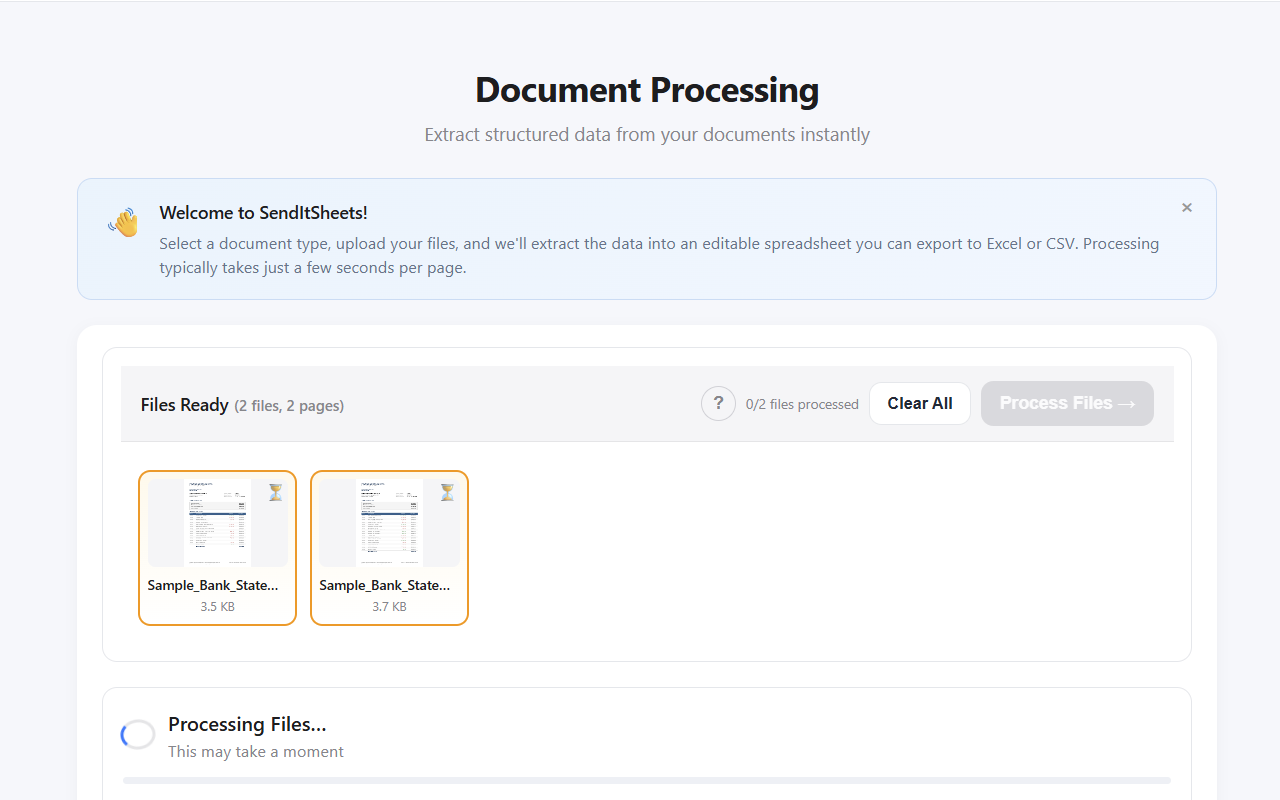
Drop a PDF, see the extraction No template selection, no field mapping wizard, no integration setup
-
Works on most US bank formats automatically Major banks, regional banks, and credit unions in the same workflow
-
Handles scanned and photographed statements OCR reads the document first, then structured extraction takes over
-
Multiple statements at once Drop 1 or 50 statements, batch processing splits them automatically
Validation that catches what other tools miss
Every extraction is automatically validated for balance reconciliation, transaction completeness, and duplicate detection. If something's off, you see exactly where, before you import to QuickBooks.
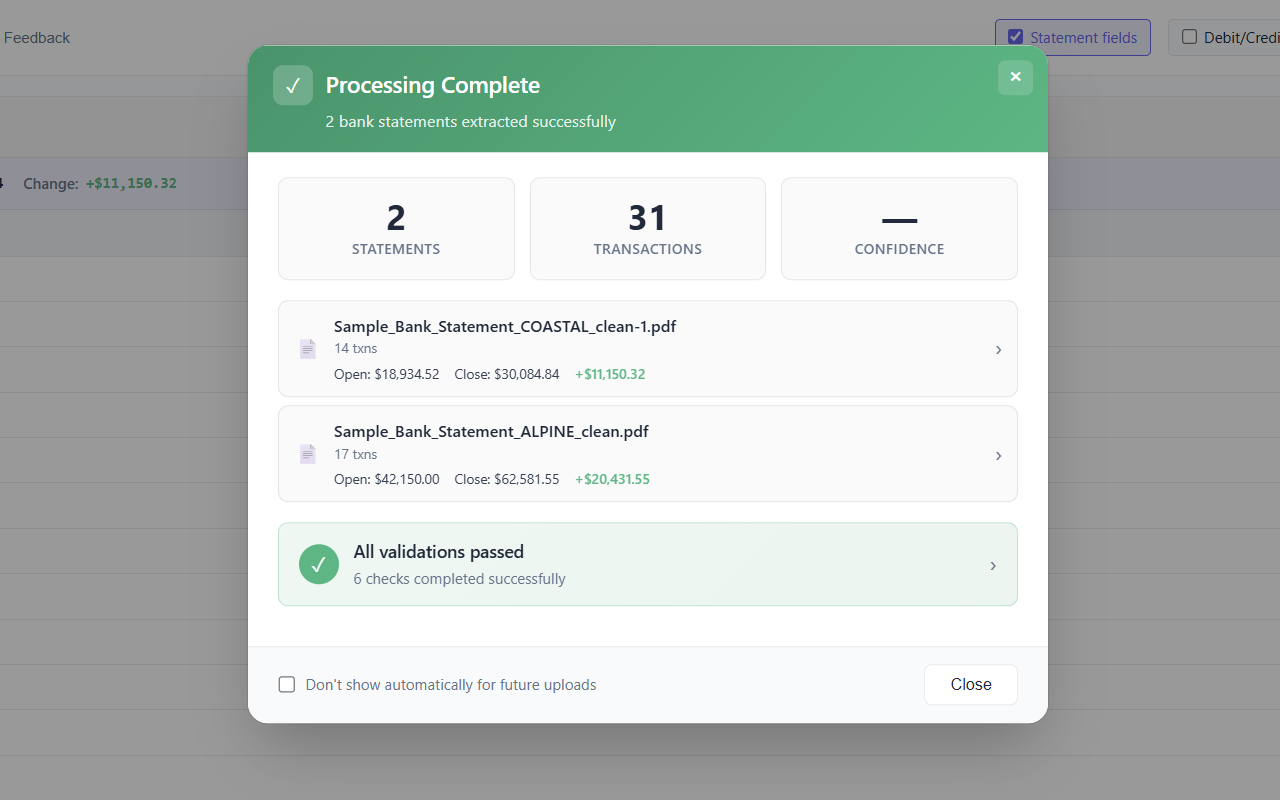
Balance verified, no issues
Beginning balance + transactions = ending balance, automatically reconciled. Open and close balances cross-check against each statement before download.
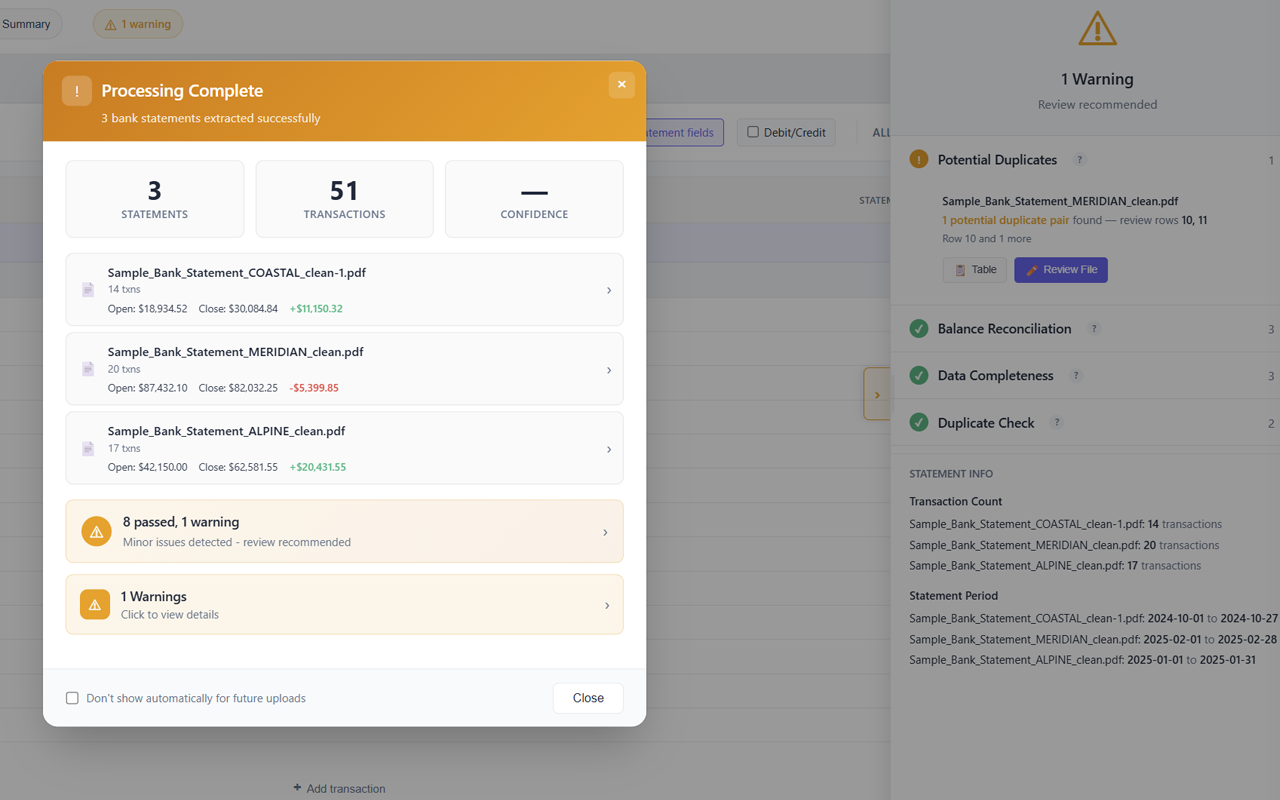
Duplicate detected, review recommended
Potential duplicate transactions are flagged with row references so you can review and resolve before exporting. No silent errors making it into your bookkeeping.
Duplicates flagged in context, not in a separate report
When the validator finds potential duplicates, the affected rows are highlighted directly in the transaction view. You decide whether to keep, edit, or remove. The tool doesn't silently delete anything.
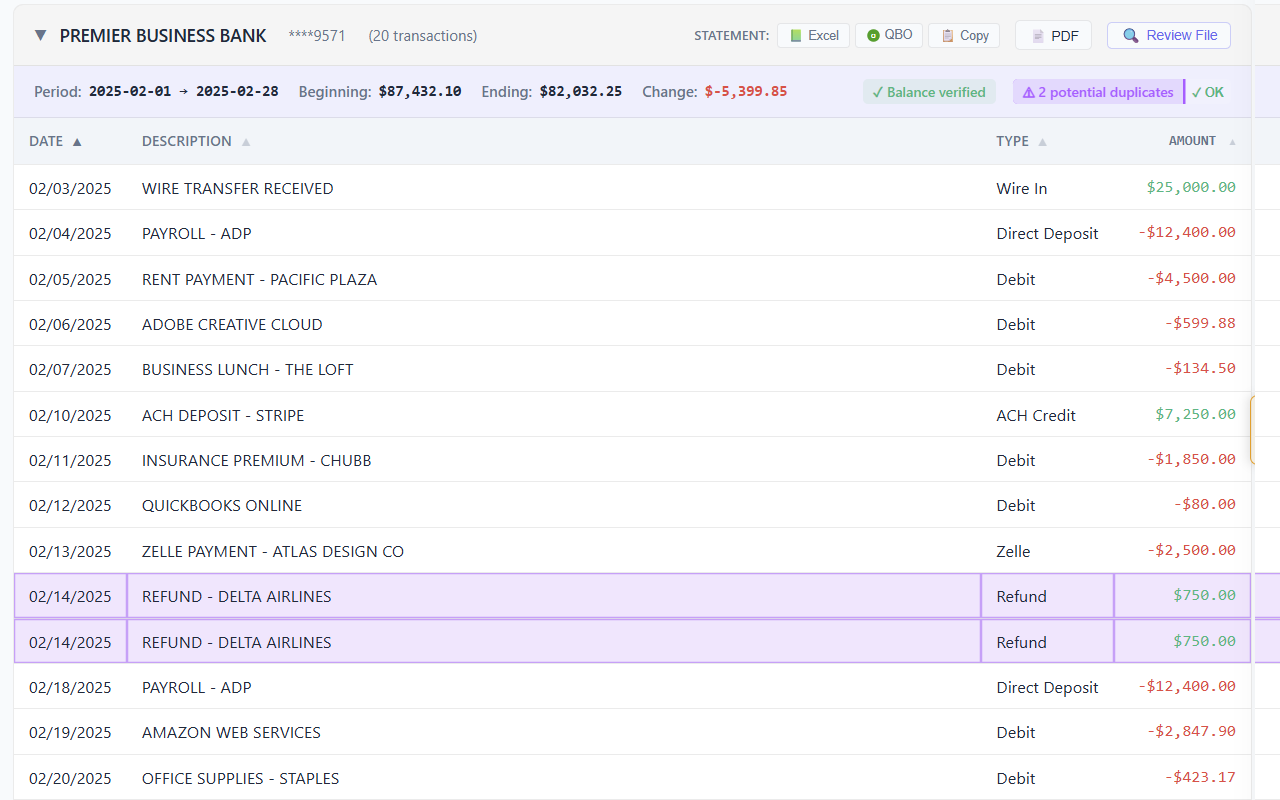
Each statement gets its own panel with a balance verification badge, period dates, and inline duplicate warnings. Duplicates show up where the data is, not buried in a separate validation report.
How to convert PDF bank statements to Excel
Three steps from PDF to clean Excel. No templates, no integrations, no configuration.
Upload your PDFs
Drop one statement or fifty into the upload area. SendItSheets accepts PDFs, scanned images, and phone photos in the same batch.
The tool starts processing immediately. There is no document type to choose, no template to configure.
Review the extraction
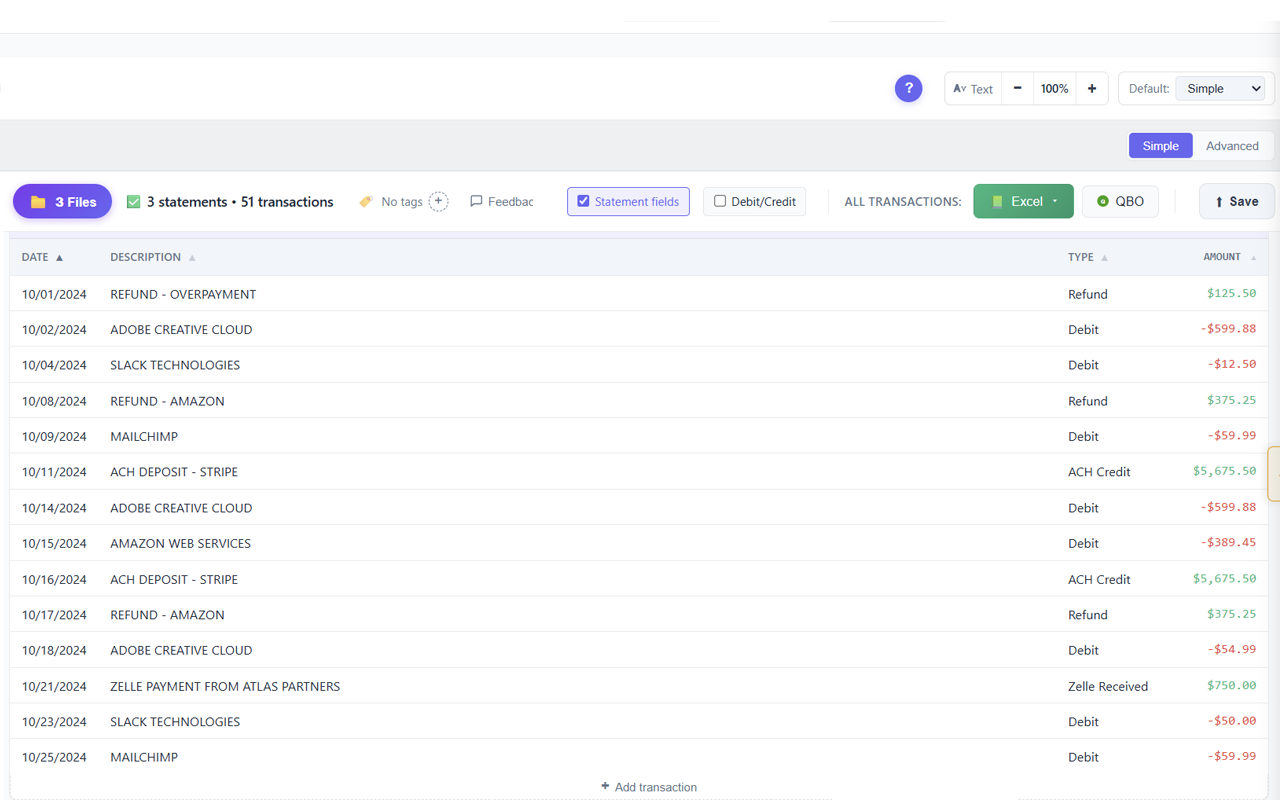
Every transaction extracted: date, description, type, amount, with balance validation already complete. Edit anything that needs correction before export.
Multi-account and multi-period statements are split automatically with separate balance checks for each section.
Export to your accounting workflow
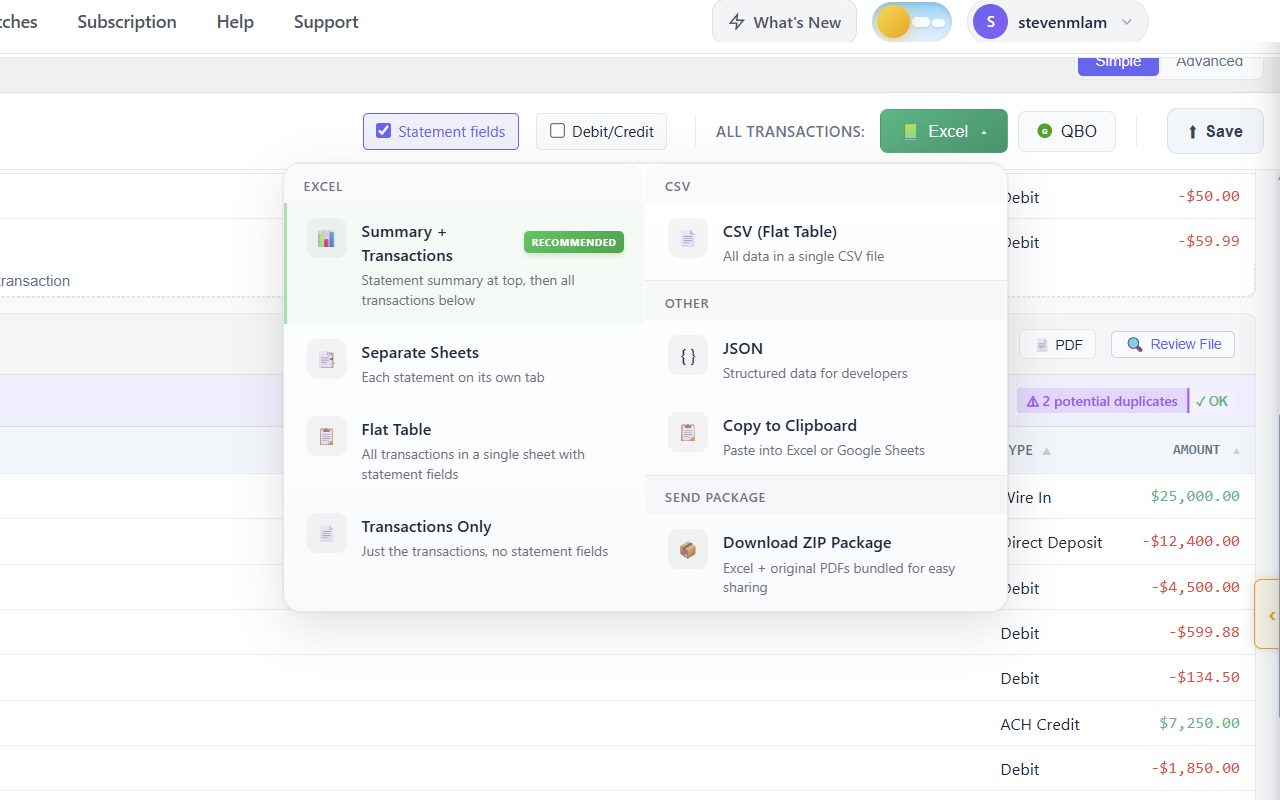
Download as Excel (multiple layouts), CSV (flat or summary+transactions), QBO for QuickBooks Online, JSON for developers, or copy directly to clipboard for Google Sheets paste.
Every export includes the validated balance reconciliation so reviewers downstream can confirm the data is clean.
How SendItSheets compares to typical PDF converters
Generic PDF converters extract text. Bank statement extraction tools should do more.
| Capability | Typical PDF converters | SendItSheets |
|---|---|---|
| Bank statement format handling | Text extraction only, manual cleanup required | Structured extraction with date, description, type, and amount columns |
| Balance reconciliation | Not checked, errors carried into your books | Beginning + transactions = ending balance, verified automatically |
| Duplicate detection | Silent, duplicates land in your bookkeeping | Flagged with row references, you decide how to resolve |
| Debit/credit sign validation | Easy to get wrong, deposits showing as withdrawals | Classified using description analysis and verified against totals |
| Batch processing | One file at a time | Multiple statements processed in one batch session |
| Multi-account statements | Accounts merged together, requires manual splitting | Each account gets its own section with separate balance checks. Methods compared → |
| QuickBooks import | Manual CSV cleanup, format errors, no balance verification before import | Native QBO export with balance validation already complete. Step-by-step guide → |
| Scanned and photographed statements | Often not supported, requires separate OCR | OCR built in, scanned and photo statements work the same way |
| Review before export | Output is fixed, errors found after the fact | Edit any cell, see validation update in real time |
| Setup required | Templates, field mapping, integration configuration | Drop a PDF, extraction starts immediately |
Built for these workflows
SendItSheets fits specific workflows particularly well. Knowing whether your situation is one of them saves you time evaluating tools.
Tool evaluation
You need to verify a bank statement extraction tool actually works on your client's specific bank before committing to a subscription.
One-time cleanup projects
You're processing a backlog of statements (year-end catch-up, new client onboarding, software migration) without committing to ongoing tooling.
Multi-client batch work
You handle multiple clients' statements in one session and don't want a per-client subscription. One account processes everyone.
CSV-driven workflows
You need clean structured data for QuickBooks import, accountant handoffs, or spreadsheet analysis, not deep ongoing automation.
Bank Statement to Excel: Common Questions
More bank statement guides
Chase bank statement to CSV · Bank of America statement to CSV · Wells Fargo statement to CSV · Capital One bank statement to CSV · Citibank statement to CSV · U.S. Bank statement to CSV · Scanned bank statement extraction · Multi-account bank statements · PDF bank statement to QuickBooks · Bookkeeping cleanup for bank statements · Bank transaction CSV formatter
Working on receipts too?
SendItSheets handles receipt extraction to Excel with the same workflow as bank statements. Bookkeepers running cleanup projects often need both. See the bookkeeping cleanup workflow for processing receipt piles during catch-up engagements.
Try it with your own bank statement
Drop a real PDF. See the extraction in seconds. Decide afterward.
Upload bank statement nowFree 14-day trial, 30 pages, no credit card required. Or create an account first to save your conversion history.